
Battery Management System Reset: What It Is, When You Need One & How to Do It Safely
Posted on September 16, 2025

Is your car showing erratic battery warnings, struggling to hold a charge, or just not performing like it used to? The issue might not be the battery itself—it could be its brain.
The Battery Management System (BMS) is the sophisticated computer that oversees your vehicle's battery health, ensuring it charges, discharges, and performs efficiently and safely. But like any computer, it can sometimes glitch, lose calibration, and provide false readings.
A Battery Management System Reset (or BMS reset) is a crucial procedure that reboots this system, often resolving issues like:
- Inaccurate battery charge indicators
- Reduced power or sluggish acceleration
- Unexplained warning lights on your dashboard
- Problems after a battery replacement
In this guide, we’ll break down exactly what a battery management system reset is, when it’s necessary, and how you can do it safely. By the end, you’ll have a clear picture of how this simple BMS reset procedure can keep your battery performing at its best.
What Does “BMS” Mean?

BMS stands for Battery Management System, and it’s basically the brain of your battery. All batteries, whether they’re lead-acid, lithium-ion, or another type, naturally lose capacity over time.
The BMS keeps an eye on your battery’s health, monitoring important factors like current, voltage, and temperature to make sure everything is working safely and efficiently. It also balances the battery pack, making sure each cell in the battery has the same voltage to prevent uneven wear.
Using the information it collects, the BMS decides how much charge the battery can safely take and estimates how much energy is left before the battery needs recharging. This helps protect the battery, extend its life, and keep your device or vehicle running smoothly.
What Causes BMS Failure?
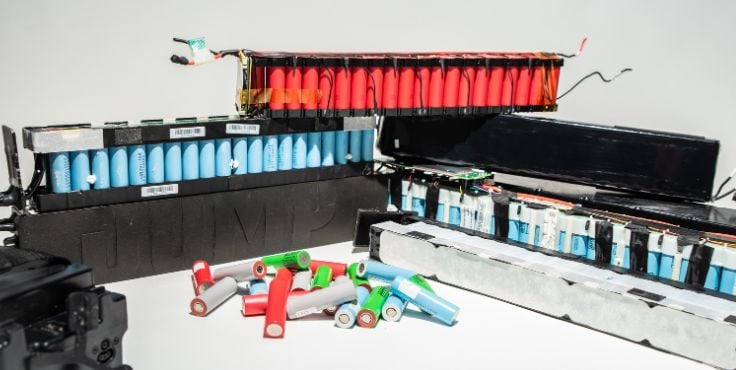
A Battery Management System can fail or become miscalibrated for several reasons. Understanding these causes can help you prevent problems and keep your battery in good shape:
1. Overcharging
Continuously charging the battery beyond its recommended limit can stress the cells and confuse the BMS. Over time, this can lead to incorrect readings and reduce the battery’s overall lifespan.
2. Heat Damage
High temperatures can affect battery chemistry and the electronic components in the BMS. Exposure to excessive heat can cause the system to misread the battery’s state or even fail entirely.
3. Voltage Imbalance
If individual cells in the battery pack have different voltages, the BMS can struggle to manage the pack effectively. This often happens when the battery isn’t cycled through its full charge range regularly, like keeping it mostly at 70% charge.
4. Software Glitches
Like any electronic system, the BMS relies on software to process data and make decisions. Bugs, firmware issues, or failed updates can throw the system off, leading to inaccurate monitoring and potential performance issues.
By keeping an eye on these factors and maintaining good charging habits, you can help your BMS stay accurate, and your battery stay healthy.
Precautions Before Resetting BMS

Resetting a Battery Management System can help restore proper function, but it’s important to take safety and preparation steps first. Here are the key precautions to follow:
1. Make Sure the System is Off
Before starting, turn off the device or vehicle connected to the BMS. This prevents current surges, relay activation, or accidental short circuits while resetting the system.
2. Use Personal Protective Equipment
When working with high-voltage batteries, wear insulating gloves and eye protection. Ensure the area is dry, well-ventilated, and free of flammable materials to reduce safety risks.
3. Use Appropriate and Safe Tools
Only use tools recommended by the battery manufacturer, such as OBD2 scanners, official software, or proper communication cables. Avoid cheap or generic tools that could damage the BMS firmware.
4 . Understand the System Structure and Manufacturer’s Guide
Not all BMS units reset the same way. Check the user manual, datasheet, or manufacturer’s website before proceeding. Some resets can delete important data or change system configurations, so knowing exactly how your BMS works is critical.
5. Data or Configuration Backup (If Possible)
Advanced BMS systems, like those in electric vehicles, often store battery life cycles, error logs, and cell status. If the system allows, back up this data before performing a reset to avoid losing important information.
6. Understand the Potential Risks After Resetting
Resetting may alter battery SoC readings, error logs, or temperature calibrations. If done improperly, it can cause incorrect capacity readings, undetected errors, or imbalances between cells, potentially affecting performance or safety.
Following these precautions ensures a safer and more effective BMS reset while protecting both the battery and yourself.
Why Should You Reset the BMS?
Resetting the BMS restores it to its default settings, allowing the system to properly manage battery performance. This can help extend your battery’s lifespan by ensuring it uses power efficiently and maintains balanced operation.
A BMS reset can also fix issues by clearing stored data and rebooting the sensors, giving the system a fresh start to monitor the battery accurately. It’s usually needed only when the battery isn’t performing as expected, the BMS is malfunctioning, or a new BMS has just been installed.
Even in non-electric vehicles, a basic BMS may require a reset after a 12-volt battery replacement or system error to ensure everything works correctly.
Signs the BMS Needs to Be Reset

Here are common symptoms that indicate your BMS might need a reset:
1. Battery Not Charging Properly
If your battery drains quickly or struggles to hold a charge, it may be a sign that the BMS isn’t managing it correctly. In older batteries, this could also mean the battery itself is wearing out.
2. Overheating Battery
A malfunctioning BMS can cause the battery to overheat, which may lead to engine performance issues, smoke, foul smells, or even hissing sounds. In extreme cases, it can be a serious safety hazard.
3. Frequent False Alarms
If warning lights or error messages appear even when the battery is functioning normally, the BMS sensors might be misreading data. Resetting the system can recalibrate these sensors and stop unnecessary alerts.
4. Inconsistent Charging
Fluctuations in voltage during charging are another sign the BMS may be out of sync. A reset can help stabilize charging patterns and ensure the battery receives the correct voltage.
Watching for these signs can help you decide when a BMS reset is necessary to maintain battery health and vehicle performance.
How to Reset the BMS
Resetting a Battery Management System can usually be done manually or through software, depending on your vehicle or device. Here’s a step-by-step guide for both approaches:
1. Manual Reset (Common for EVs and Hybrid Vehicles)
A manual BMS reset is a straightforward way to recalibrate your battery using simple charge and discharge cycles. This method helps the BMS properly read the battery’s limits and ensures it can manage the battery efficiently. Follow these steps carefully:
Bring the Battery to a Low State of Charge
Drive or use the device until the battery drops to around 10% or lower. Single-digit charge levels are ideal for allowing the BMS to accurately detect the lower limits of the battery’s discharge.
Let the Battery Stabilize
After reaching a low charge, let the battery sit for at least an hour while keeping the system active (for example, checking the car through its app or periodically locking/unlocking doors). This helps the BMS stabilize and properly read the battery cells.
Charge the Battery Fully
Recharge the battery to 100%, ensuring any previous charge limits are removed. This allows the BMS to calibrate across the full charge range. After a full charge, check the displayed range to confirm the reset. Some vehicles may require a second full cycle to complete the process.
2. Software-Based Reset (Using Manufacturer Tools or Apps)
For some vehicles and devices, the BMS can be reset more precisely using manufacturer-recommended software or apps. This method allows the system to be recalibrated electronically and is especially useful for advanced or high-voltage battery systems. Here’s how to do it:
Connect the Device or Vehicle
Use the manufacturer-recommended software, OBD2 scanner, or app to connect to the BMS.
Backup Data if Possible
Before performing the reset, save any configuration, error logs, or battery history available in the system.
Perform the Reset via Software
Follow the manufacturer’s instructions to reset or recalibrate the BMS. This process usually clears stored data, reboots sensors, and restores default settings.
Verify Calibration
Once the reset is complete, monitor battery readings and charging behavior to ensure the BMS is functioning correctly. A full charge-discharge cycle may still be necessary to complete calibration.
Following these steps carefully can help restore BMS accuracy, improve battery performance, and extend the life of your battery.
Alternatives to Resetting BMS Batteries

Resetting the BMS isn’t the only way to fix battery problems. There are a few alternatives you can try first.
- Perform a Discharge and Recharge Cycle: Fully discharge the battery and then charge it back up. Using a load, like a resistor, on the battery’s terminals can help safely discharge it. This can help the BMS recalibrate without a full reset.
- Check for Firmware or Software Updates: Some BMS issues can be fixed by updating the system’s software. Updates often improve performance and resolve certain bugs.
If these methods don’t solve the problem, a BMS reset or professional help from a mechanic may be necessary. They can diagnose the issue and ensure the battery and BMS are functioning correctly.
Not Sure About a BMS Reset? Let the Experts Handle It

A BMS reset can be a powerful fix for restoring battery accuracy and performance, but it's not always the right solution for every electrical glitch. Knowing when to reset your battery management system and when to seek professional diagnostics is key to protecting your vehicle's complex electronics.
While a simple reset can sometimes work, underlying issues like a failing battery, a faulty alternator, or a software bug often require a professional touch.
Trust Your Vehicle's Vital Systems to CarHub Caledon Chrysler
Our certified technicians use advanced diagnostics to pinpoint the true cause of your battery issues, ensuring we apply the correct fix—not just a temporary workaround.
Schedule a battery health check today! Book your appointment online.
Don't guess; get certainty. Ensure your vehicle is safe, reliable, and performing at its best. Explore more essential maintenance tips on the CarHub Caledon Chrysler Blog.